Widget Ayarları
Admin panelindeki gelişmiş ayarlar, widget’ın görünümünü ve ziyaretçi kayıt formunu belirler. Bu değerler Widget API’nin settings yanıtındaki widgetConfigs ile aynı kaynaktan gelir.
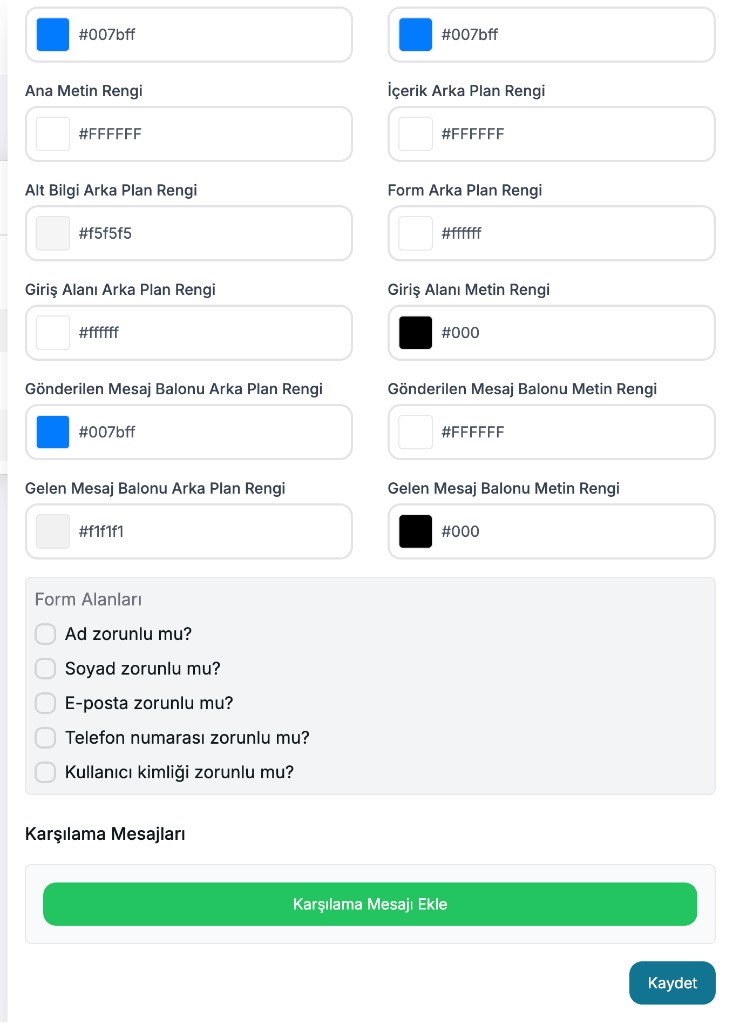
Renkler
| Panel etiketi | Config anahtarı | Örnek |
|---|---|---|
| Ana Arka Plan Rengi | primaryBackgroundColor | #007bff |
| Ana Arka Plan Bitiş Rengi | primaryBackgroundColorStop | #007bff |
| Ana Metin Rengi | primaryTextColor | #FFFFFF |
| İçerik Arka Plan Rengi | contentBackgroundColor | #FFFFFF |
| Alt Bilgi Arka Plan Rengi | footerBackgroundColor | #f5f5f5 |
| Form Arka Plan Rengi | formBackgroundColor | #ffffff |
| Giriş Alanı Arka Plan Rengi | inputBackgroundColor | #ffffff |
| Giriş Alanı Metin Rengi | inputTextColor | #000 |
| Gönderilen Mesaj Balonu Arka Plan Rengi | sentMessageBubbleBgColor | #007bff |
| Gönderilen Mesaj Balonu Metin Rengi | sentMessageBubbleTextColor | #FFFFFF |
| Gelen Mesaj Balonu Arka Plan Rengi | receivedMessageBubbleBgColor | #f1f1f1 |
| Gelen Mesaj Balonu Metin Rengi | receivedMessageBubbleTextColor | #000 |
Ne işe yarar?
- Ana renkler header / launcher görünümünü etkiler.
- Gönderilen balon renkleri ziyaretçi mesajları içindir.
- Gelen balon renkleri bot / agent mesajları içindir.
- Form ve input renkleri kayıt ekranını modellemek için kullanılır.
Form alanları (formInputs)
Ziyaretçi sohbete başlamadan önce hangi bilgilerin isteneceğini seçersiniz:
| Panel sorusu | Config değeri |
|---|---|
| Ad zorunlu mu? | firstName |
| Soyad zorunlu mu? | lastName |
| E-posta zorunlu mu? | email |
| Telefon numarası zorunlu mu? | phoneNumber |
| Kullanıcı kimliği zorunlu mu? | userId |
Kural: email, phoneNumber veya userId alanlarından en az biri seçilmelidir. Aksi halde ziyaretçi kimliği üretilemez.
Karşılama mesajları (greetingMessages)
Karşılama Mesajı Ekle ile kayıt sonrası sohbete otomatik yazılacak mesajları tanımlarsınız.
{
  "greetingMessages": [
    { "content": "Merhaba! Size nasıl yardımcı olabilirim?" }
  ]
}
Her eklenen mesajın içeriği dolu olmalıdır. Opsiyoneldir; eklenmezse sohbet boş başlar.
Örnek settings (widgetConfigs)
{
  "widgetIconUrl": "https://os.chatbot.aithinks.net/company-assets/.../icon.png",
  "aiIconUrl": "https://os.chatbot.aithinks.net/company-assets/.../icon.png",
  "primaryBackgroundColor": "#007bff",
  "primaryBackgroundColorStop": "#007bff",
  "primaryTextColor": "#FFFFFF",
  "contentBackgroundColor": "#FFFFFF",
  "footerBackgroundColor": "#f5f5f5",
  "formBackgroundColor": "#ffffff",
  "inputBackgroundColor": "#ffffff",
  "inputTextColor": "#000",
  "sentMessageBubbleBgColor": "#007bff",
  "sentMessageBubbleTextColor": "#FFFFFF",
  "receivedMessageBubbleBgColor": "#f1f1f1",
  "receivedMessageBubbleTextColor": "#000",
  "formInputs": ["email", "firstName"],
  "greetingMessages": [{ "content": "Merhaba!" }]
}
WhatsApp’a özgü alanlar (apiKey, partnerApiKey vb.) Widget uygulamasında tutulmaz.